HTML5 Interview Questions And Answers
HTML5 Interview Question
- What is HTML5? Define it’s purpose and use as well?
- HTML is the short form for HyperText Markup Language and with the release of it's latest version HTML5 is used diversely in crafting animated and beautiful websites by creating a web layout of amazing user experience(UX).
- The latest syntax is <!DOCTYPE>.its, not an HTML tag it instructs the browser about the version of the HTML being used.
3. Explain the
meaning of the term ‘HTML attributes’?
- These are the parts of the tags that give them context and purpose for their meaning like align attribute for <p> tag in HTML. Similarly, there are some global attributes such as class, style, id which can be used on all tags directly.
4. What are semantic
elements?
- Semantic elements
are those which clearly defines their own meaning with only like <form>, <table>, <p>, <ul> ,
<address>, <code>. While nearly every HTML4 and HTML5 tags have a semantic meaning, some
tags are primarily semantic in nature. Examples of non-semantic elements are <
div>and <span>. These tags don't tell the computer anything about the meaning of the contents of the element.
5. Is HTML5
case – sensitive?
- No. HTML tags are not case sensitive but the recommended standard is lowercase.
6. Name a few
new HTML 5 tags that will form
the core for present and future modern layouts?
- Few new elements and tags that will be found in all modern layouts are <header> , <footer> , <section> , <nav> , <article> . these are some tags found in almost all the never version of themes , templates and web layouts.
7. Explain the benefits
of using HTML5 as opposed to an earlier version of HTML.
- HTML5 has made direct functionalities and provides access for a lot of things that were before could only be used with 3rd party plugins or separate programs.
- New semantic elements that are purposefully made for their name use like <header> for header section, <footer> for footer section and other <nav>, <article>, <section> and so on.
- Improved javascript API for geolocation, drag and drop and media APIs.
- Support for audio with <audio> tag, video with <video> tag and <canvas> tag for embedding graphics directly into HTML5.
- Enhanced support for multi-platform accessibility.
- New form elements (<time>, <url> etc) and smooth validation process.
8. What are the differences between inline and block elements?
- Inline elements take only the space in their line with no margine-padding like <a>, <hr>,<span> etc. whereas block elements block the whole area once placed in the html layout like <div>, <h1> ,<p> etc.
9. Define the data - attribute in the current form of HTML5?
- Data attributes in HTML5 are used to embed custom data to an element which are quite helpful developing Single Page Web Applications in modern web development.
10. How you will explain the datalist element in HTML5?
- The <datalist> tag is used to provide an "autocomplete" feature on <input> elements. Users will see a drop-down list of pre-defined options as they input data.
11. Can you link an image with webpage? Is it possible? If possible please explain in detail.
- Linking image with a webpage is done by placing the <img> tag inside <a> and closing the tags accordingly within. Source of the image is defined with the src attribute. we can use the alt attribute to display something whenever source cannot found by the browser.
12. How can differentiate between <article> and <section> tags?
- <article> defines a document whereas <section> is part of the page. Both can be used inside each other as the conditions ask for it with the purposely defined structure in the web layout.
13. What are web workers?
- These are just Javascript files that run in the background.
14. Explain the media tags associated with HTML5?
- <audio> and <video> tags are the new addition in the HTML5 that requires specific JS library if additional required.
15. Are we allowed to multiple uses of tags like <header>, <footer> in the information of the web layouts of the designing?
- Yes, these two tags <header>, <footer> have been created with the purpose of using them multiple time for every part of the body(section). Every section can have their own <header> tag and <footer.tag marking their own identity in the HTML.
16. Which tag has replaced most of the properties of flash in HTML5?
- <canvas> is the tag that has a lot of properties similar to flash directly integrated into HTML5 with access for drawing boxes, paths, circles, text and graphic images.
17. Can we create new elements in HTML5? Are there any criteria for it?
- Yes, you can create new elements but using JavaScript with purposeful meaning.
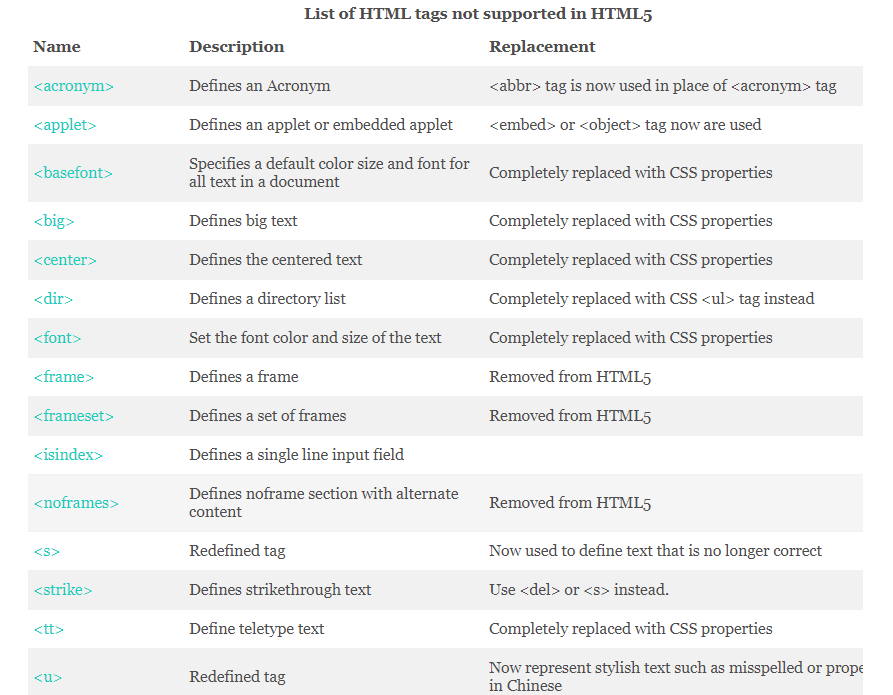
18. List a few tags that are now not supported with HTML 5?
- There are some tags that are either replaced with new tags or merged with some old ones and some replaced with CSS properties entirely. These are
19. Can you store data locally in HTML5?is there a possibility? Explain!
- Yes, HTML5 offers local storage within the user's browser. Earlier this functionality was handled by cookies. Local storage through HTML5 is permanent until the user deletes it himself whereas Session storage is over as soon as you close the browser of your system.
20. With the advent of HTML5, are there any changes in API use for HTML5 with web development?
- Yes, there quite a few changes with API integration with HTML5 that are new and will make development easy like High-Resolution Time API, Media API, Text track API, User timing API, Data Transfer API, Command API, History API creating web environment for future.
21. What is the default Browser font size of HTML5?
- 16px is the browser default in case there is no specified font size value being assigned in CSS. Otherwise, the given value will take effect respectively.
22. Is it necessary to close HTML tags while making layouts?
- Yes. One must close all the tags as they might have individual properties with respect to inline or block elements.But there are single elements can survive without closing like <hr>, <br>,<img>,<input>,<meta>.
23. Can we use percentage in font sizes?
- Only if we use them with a specific set for e.g. if the website is set with default size 16px than we can use values like em to scale them with our choice i.e 1.25%em. font measuring units like px are absolute while em, pt are scalable.
24. What is HTML Shiv?
- HTML Shiv is javascript fix made by Individual brilliance of Sjoerd Visscher for enabling styling of HTML5 Internet Explore that is prior to version 9.
25. What is HTML5 boilerplate?
- HTML5 Boilerplate is a professional front end template that is used to create fast, robust and adaptable HTML5 sites that are Cross Browser compatible features.
26. Which is the most correct as per HTML5 Standards..<br>,<br/>, or <br/>?
- As per HTML5 Standards <br> is enough to get the desired results but these values most often will give you the same results. Until HTML4 <br/> was allowed and if you are using XHTML it is still preferred.
27. What is HTML5 ARIA?
- HTML5 ARIA stands for HTML5 Accessible Rich Internet Application i.e. standard semantic markup that web developers can add to HTML tags that allow better reading standards for the screen reader. the role, attribute button tag for the button, lat attribute that provides user information, informative links building with titles, language declaration, and more semantic HTML standards. These ARIA standards allow disabling friendly HTML5 behavior to the web pages.
28. What are meta charsets? Why are they written?
- Along with Doctype, these meta charsets define the type of HTML document is written in. Below is the standard meta charset notation defined in HTML5. They are written to define the browser support for the HTML respectively.
<meta charset = "utf-8" />
29. Which type of video formats are accepted with HTML5 video tags?
- MPE4, WEBM, OGG are the three standards video format supported by HTML5 tags while you can run others using right codecs, plugins, and libraries.
30. Do all browser support HTML5?
- Yes all latest version of browser support HTML5 although there are specific elements which have some issues which can be fixed by writing browser-specific CSS
Hope this will be useful. Request to read this and leave a comment.


Comments
Post a Comment